- Log into your Wordpress Admin area.
- Click on the "NEX-Forms" menu item from the admin sidebar.
- Edit an Existing form or "Add a New Form"
-
While in the NEX-Forms Builder click on any of the tours from the menu found in the top right corner of the NEX-Forms builder.

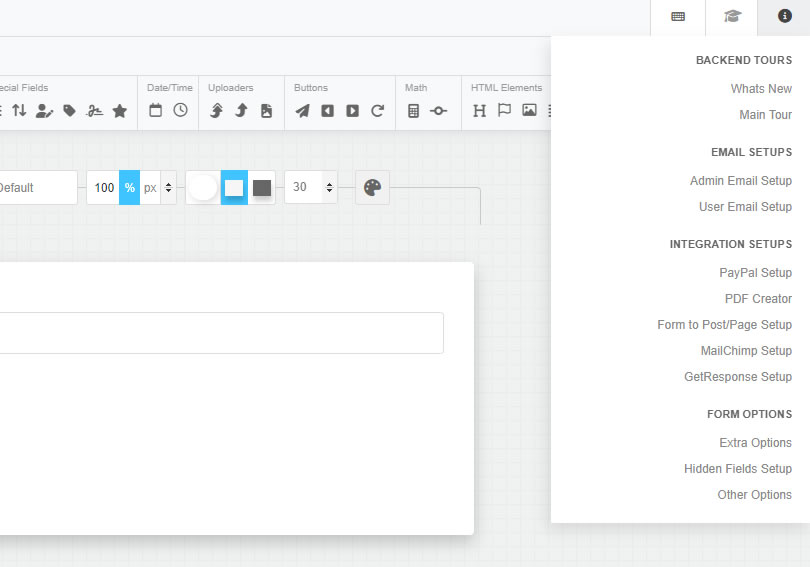
-
Once you have started a tour, you will be taken through all the various aspects of the tour that you have selected. Use your keyboard's back and forward arrow keys to navigate the tour, or click on the NEXT and PREV buttons.
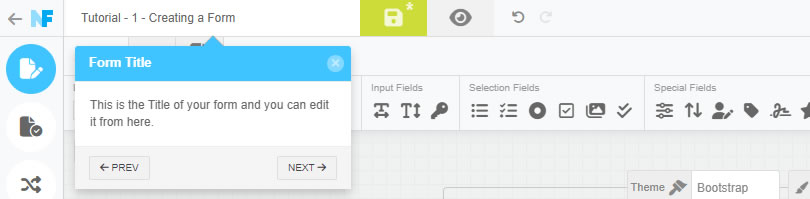
NEX-Forms Documentation
Documentation & Tutorials for NEX-Forms version 8.0 and above
Accessing the NEX-Forms backend Tours
Take the NEX-Forms backend tours, as they will save you time by providing a head start in understanding where to find what you need when creating forms.
Starting a NEX-Forms Backend Tour
Was this article helpful?
Still having trouble? How can we help you?
This article was last updated on 19 November 2024
Popular Articles
Stay in Touch
Get the latest NEX-Forms news and info by following us on:
In this article


Martin Lanthaler recently bought a NEX-Forms - BASIC Plan

Willy HILAIRE recently bought a NEX-Forms - BASIC Plan

Ben Vossenaar recently bought a NEX-Forms - BASIC Plan

Dan Rana recently bought a NEX-Forms - BASIC Plan

Davis Clark recently bought a NEX-Forms - BASIC Plan